Webhooks
A simplified webhook fairy tale:
- You
kubectl create -f blah.yamlsomething, but its incomplete, for example, its missing all it's TKR metadata. - The API Server sends your webhook to a helper service, which reads blah.yaml, and updates it.
- The API Server then recieves the webhooks transformed object, which now has some data in it that you forgot.
- The API Server happily stores your now complete object.
In CAPI: The CAPI Cluster object is a "placeholder" for all the objects associated w/ a Kubernetes cluster, many of which you may not know how to create. I'ts underlying implementation logic is thus spread between many webhooks which finish off your request, adding all the right data to it, so that your cluster is fully defined and TKG controllers know what to install, where to install it, how many nodes to create, and so on.
As a VERY QUICK first example, for ClusterAPI, theres a webhook when you make a new cluster....
apiVersion: admissionregistration.k8s.io/v1
kind: MutatingWebhookConfiguration
metadata:
  rules:
  - apiGroups:
    - cluster.x-k8s.io
    apiVersions:
    - v1beta1
    operations:
    - CREATE
    - UPDATE
...
... It applies to objects of type cluster.x-k8s.io and, when you CREATE such an object in kubernetes, that Webhook then "does stuff". There are many such webhooks at work in TKG. We wont examine this webhook now, but instead, we'll look at another webhook, for Antrea which is less abstract and easier to grok if your new to TKG.
What is a webhook ?
Let's forget TKG for a second. And look at a webhook for antrea. CAPI isnt the only kid on the block with a pocket full of webhooks.
If you look in the codebase for Antrea, we can see that when you make a new object, theres alot of logic that needs to be done to default things. For example, a new AntreaPolicy needs to have a "tier" which helps antrea to decide what the priority of that network policy is relative to other policies...
// https://github.com/antrea-io/antrea/blob/main/pkg/controller/networkpolicy/mutate.go#L111
func (m *NetworkPolicyMutator) mutateAntreaPolicy(op admv1.Operation, ingress, egress []crdv1alpha1.Rule, tier string) (string, bool, []byte) {
    ...
    // Mutate empty tier name to the name of the Default application Tier.
        if tier == "" {
            allPaths = append(allPaths, fmt.Sprintf("/spec/tier"))
            allValues = append(allValues, defaultTierName)
So, how do we make sure that the APISErver calls this mutateAntreaPolicy function when a user makes a new Antrea CRD? Via a webhook YAML blob:
---
# Source: antrea/templates/webhooks/mutating/crdmutator.yaml
apiVersion: admissionregistration.k8s.io/v1
kind: MutatingWebhookConfiguration
metadata:
  name: "crdmutator.antrea.io"
  labels:
    app: antrea
webhooks:
  - name: "acnpmutator.antrea.io" <-- "When you cee an acnpmutator related HTTP request... "
    clientConfig:
      service:
        name: "antrea" <--- "Send the request to the antrea service in the kube-system namespace..."
        namespace: kube-system
        path: "/mutate/acnp"   <-- "At the path http://kuberentes.kube-system.service.local:443/mutate/acnp..."
    rules:
      - operations: ["CREATE", "UPDATE"] <-- "... If it is a create request"
        apiGroups: ["crd.antrea.io"] <-- "... and its making an antrea CRD"
        apiVersions: ["v1alpha1"] <-- "... of version v1a1"
        resources: ["clusternetworkpolicies"] <-- "and its a CLUSTER NETWORK POLICY "
        scope: "Cluster"
    admissionReviewVersions: ["v1", "v1beta1"]
    sideEffects: None
    timeoutSeconds: 5
  - name: "anpmutator.antrea.io"
    clientConfig:
      service:
        name: "antrea"
        namespace: kube-system
        path: "/mutate/anp" <--- DO THE SAME THING for ANTREA NETWORK POLICIES
    rules:
      - operations: ["CREATE", "UPDATE"]
        apiGroups: ["crd.antrea.io"]
        apiVersions: ["v1alpha1"]
        resources: ["networkpolicies"]
        scope: "Namespaced"
    admissionReviewVersions: ["v1", "v1beta1"]
    sideEffects: None
    timeoutSeconds: 5
Even though this webhook works on the internal kubernetes service (i.e. bc antrea is a pod running in K8s), you can have a Webhook live on an external URL:
apiVersion: admissionregistration.k8s.io/v1
kind: MutatingWebhookConfiguration
webhooks:
- name: my-webhook.example.com
  clientConfig:
    url: "https://my-webhook.example.com:9443/my-webhook-path"
Why do webhooks matter so much in TKG ?
Much of the logic for the cluster's underlying functionality (like, the details of its CNI or TKR or CSI), are provided by webhooks.
To trace the relationship of the webhooks to the bigger picture, we need to first understand what a Cluster is, and what a ClusterClass is: because these define, from a user perspective, the cluster's capabilities. The Webhook's job is to provide the underlying details about those capabilities. For example:
TKG related Webhooks
- A user sais they want k8s 1.24. A webhook goes off and figures out exactly what OSImage needs to be used.
- A user sais they want calico. A webhook adds the calico package details to their cluster to make sure its installed at the right version.
- ... TODO add more details of these ...
Ok, now, lets see what drives webhook behaviour: The cluster and clusterclass setup.
Cluster vs ClusterClass
Now, let's get back to understanding clusters and cluster classes. We can see the difference between a CLUSTER and its CLUSTER CLASS below:
| Cluster | Cluster Class |
|---|---|
| infraRef | infrastructure |
| controlPlane Ref | controlPlane |
| variable... | patches... |
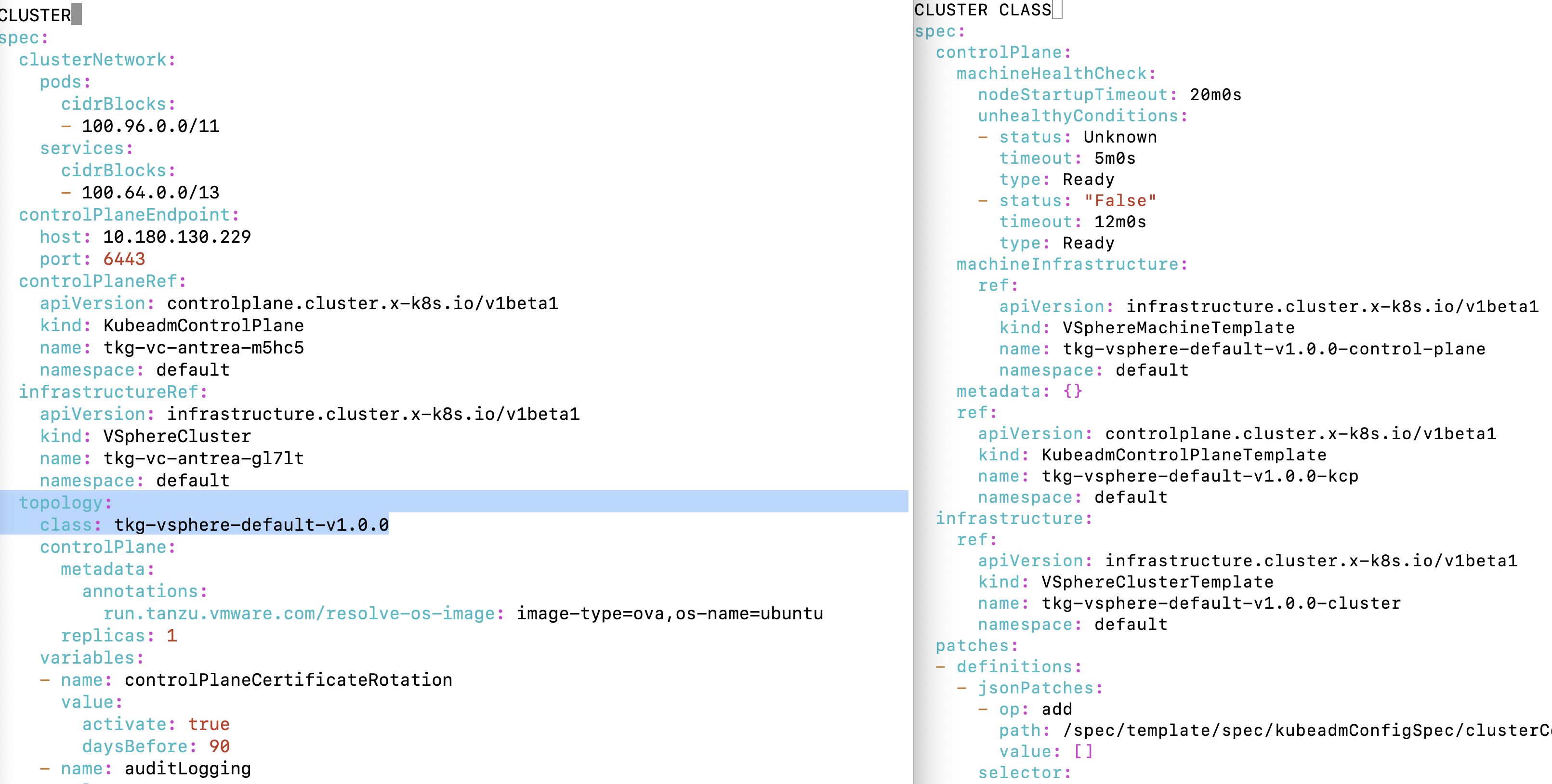
Looking at them concretely
- we can see the Cluster claims that it wants to be of "topology" of the ClusterClass on the right.
- we can also see that the Cluster got UPDATED after its creation, to have links to its KubeadmControlPlane and VSphereCluster objects.
We can verify that any CAPI cluster's implementation details exist on our cluster.
kubo@jjxn5jOMLHHOn:~$ kubectl get VsphereCluster | grep antrea
tkg-vc-antrea-gl7lt   true    10.180.130.162   5d18h
kubo@jjxn5jOMLHHOn:~$ kubectl get KubeadmControlPlane | grep antrea
tkg-vc-antrea-m5hc5   tkg-vc-antrea   true          true                   1          1       1         0             5d18h   v1.24.9+vmware.1
What happens when you make a cluster?
- You install a tanzu management cluster via
tanzu mc create ... - The tanzu cli, during installation, creates a K8s APIServer that runs on a Management Cluster.
- Then the tanzu cli adds CAPI controllers to the APIServer, along with webhook definitions which point to those controllers.
- NOW, any CAPI
Clusterobject that you make is "pre-processed" by the webhook! - one of these webhooks is the
tkr-vsphere-resolver...
Next, you might make a workload cluster:
- You run
tanzu cluster create... --tkr ...", making a new workload cluster. - A
Clusterobject is created for you by tanzu and sent to the APIServer as YAML. - The APIServer sees that theres a Cluster object, and so immediately calls out to the
tkr-vsphere-resolverMutating Cluster Webhook to finish creating it. - Webhook goes off and talkes to Vsphere, to query the
<VERSION>values for all OS Templates - It then writes this data into the TKR_DATA field.
- APIServer recieves back the "mutated"
Clusterstruct from the webhook, now having - fine grained OVA path info
- TKR_DATA fully defined
- Now, CAPI reads your
toplogy, and it: - makes MachineDeployment objects
- makes KubeadmControlPlane objects
Ok. So, thats how webhooks play into your overall cluster creation:
- They act AFTER you call tanzu cluster create...
- but BEFORE CAPI actually goes off and starts making the vsphere and CAPI objects that define your underlying infrastructure
What is a Cluster ?
Looking at a TKG Cluster, we find a topology field....
apiVersion: cluster.x-k8s.io/v1beta1
 kind: Cluster
 spec:
   topology:  <----------------------------- this defines the type of cluster your making !!!
    class: tkg-vsphere-default-v1.0.0
    controlPlane:
      metadata:
        annotations:
          run.tanzu.vmware.com/resolve-os-image: image-type=ova,os-name=ubuntu
This comes from the upstream ClusterClass topology API: https://kubernetes.io/blog/2021/10/08/capi-clusterclass-and-managed-topologies/... A topology
is a generic CAPI term, and it points to a class
Topology Classes
The topology of a cluster includes: - ControlPlane configuration - Worker configuration - Customizations to the Worker and ControlPlane VMs
Theres a larger section with these details in TKG Annotated here which goes through the gory details of how these things are configured.
In this article we'll specifically look at the WEBHOOK implementation details, which are triggered whenever you run tanzu cluster create -f... which add all the details to your desired cluster (for example, the TKR information, the Operating system image information, the CNI configuration details, and other things you probably dont want to think about).
What goes into a Topology ?
To understand webhooks, we need to look at the fields that youre allowed to configure in the topology of your cluster.
There are several key value pairs that are given to a ClusterClass cluster topology. We can see that these are product specific:
    - name: controlPlaneCertificateRotation
    - name: auditLogging
    - name: podSecurityStandard
    - name: apiServerEndpoint
    - name: aviAPIServerHAProvider
    - name: vcenter
    - name: user
    - name: controlPlane
    - name: etcdExtraArgs
    - name: worker
    - name: VSPHERE_WINDOWS_TEMPLATE
    - name: vipNetworkInterface
    - name: cni
    - name: network
    - name: kubeVipLoadBalancerProvider
    - name: nodePoolLabels
    - name: ntpServers
    - name: additionalFQDN
    - name: controlPlaneTaint
    - name: apiServerExtraArgs
    - name: kubeSchedulerExtraArgs
    - name: kubeControllerManagerExtraArgs
    - name: controlPlaneKubeletExtraArgs
    - name: workerKubeletExtraArgs
    - name: tlsCipherSuites
    - name: eventRateLimitConf
    - name: TKR_DATA
When a user creates a new TKG cluster, they dont memorize the path and the MOID of it the VMs they want CAPV to use. Alternatively, they specify a few high level parameters (i.e. ubuntu, 2004, ...) and TKG figures out, for them... what exact OS Image (including the path on vsphere) shoudl be sent to their underlying MachineDeployment and KubeAdmControlplane objects.
Let's learn how the last field , TKR_DATA is populated with specific VSphere OVA paths.
A Quick Sketch
Ok, so lets look at how the above fields
                         ┌──────────----------+
                         │  tanzu cluster     |
                         │  create            |─────────-----------> Cluster.topology = MyClusterClass
                         │  --tkr=xyz         |
                         +--------------------+
                                              │    Creates a Cluster (or TKG creates one)
                                              │
                                              │       1. User can now make CAPI objects
                                              │
                                              │                                   +---------------------------------+
                                            ┌─▼─────────────+-------------------->| webhook for tkr-vsphere-resolver|
                                            |               |                     | running in tkr-resolver pod     |
                                            │               │                     +---------------------------------+
0. kind bootstraps...                       │               │ <---- anytime you make a cluster a webhook will
                     ┌─────────────────────►│    APIServer  │       be called from your APIServer that points back
Capi is installed    │                      │               │       to CAPI pods... you can see these w/ kubectl get validatingwebhook
                     │                      │               │       and kubectl get mutatingwebhook.  TKG makes alot of these, and
                     │                      └──┬────────────┘       alot of the defaults you get for free are b/c of mutating webhooks
- CAPI pods          │                         │                    which "hydrate" your objects when you send them to the APIServer...
- Mutating hooks.    |                         |
- Validating hooks that point back to CAPIServices are put on the APISErver...
            ┌────────┴───┐                     │
            │            │                     │
            │            │                     │
            │   CAPI Pod │                     │   2. ClusterClass results in MD and KubeadmCtrlPlane creations...
      ┌─────+            │                     │.     Those objects in turn get funneled through other webhooks...
      │     │            │                     │      Its webhooks all the way down...
      │     └───┬────────┘                     │
      │         │                              │      Note that Validating Webhooks are called AFTER Mutating Webhooks.
      │      ┌──┴───────────┐                  │
      │      │ capi logic   │                  │
      │      ├──────────────┤                  │
      │      ├──────────────┴───────────────┐  │
      │      │ webhook for machine          │  │          ┌───────────────┐
      │      ├──────────────────────────────┘  │          │  Certmanager  │
      │      │ webhook for machinedeployment|◄─┘          │               │
      │      └──────────────────────────────┘             │               │
      │                                                   └───┬───────────┘
      │         Don't forget certmanager ! Certmanager has    │
      │         to give certifiactes to these webhooks        │
      └───────────────────────────────────────────────────────┘
What is in TKR_DATA
Inside of the TKR_DATA, we see version info for TKG, which can be used to know the specific version of antrea, etcd, kube-vip, and many other services which a cluster might run. Without this information, we cannot determine: - What version of the CNI provider to run for this cluster. - What version of the pause image this cluster is using. - Wether this cluster is supported by a particular TKG version And so on.
So to ensure that ALL CLUSTERS always have this data, we have a webhook... The webhook PREVENTS a cluster object from being created until the TKR data has been added to it.
The TKR_DATA object in a clusters spec.topology fields looks like this:
    - name: TKR_DATA
      value:
        v1.24.9+vmware.1:
          kubernetesSpec:
            coredns:
              imageTag: v1.8.6_vmware.15
            etcd:
              imageTag: v3.5.6_vmware.3
            imageRepository: projects.registry.vmware.com/tkg
            kube-vip:
              imageTag: v0.5.7_vmware.1
            pause:
              imageTag: "3.7"
            version: v1.24.9+vmware.1
The above fields are relatively "easy" to resolve, because theyre just K8s objects... But the Vsphere information
with the specific OVA <VERSION> information is hidden under VSphere APIs. Thus, we have a controller whose job is:
- To Query VSphere
- Find specific OVA Image template names
- Add information about those template names, and MOIDs, into the osImageRef object inside of the YAML definition for the TKR_DATA field:
        labels:
            image-type: ova
            os-arch: amd64
            os-name: ubuntu
            os-type: linux
            os-version: "2004"
            ova-version: v1.24.9---vmware.1-tkg.1-b030088fe71fea7ff1ecb87a4d425c93
            run.tanzu.vmware.com/os-image: v1.24.9---vmware.1-tkg.1-b030088fe71fea7ff1ecb87a4d425c93
            run.tanzu.vmware.com/tkr: v1.24.9---vmware.1-tkg.1
          osImageRef:
            # The NEXT TWO fields are the ones that are added by the Mutating Webhook after querying VCenter !!!
            moid: vm-51  <-- 1
            template: /dc0/vm/ubuntu-2004-kube-v1.24.9+vmware.1-tkg.1 <-- 2
            version: v1.24.9+vmware.1-tkg.1-b030088fe71fea7ff1ecb87a4d425c93
Looking just a few lines down in the same cluster object, we see that the machineDeployment definition, in fact, will reference the
- image-type: ova
- os-name: ubuntu
fields, and then those labels will be mappable to a VM Image template that can be called inside the MachineDeployment definitions.
    version: v1.24.9+vmware.1
    workers:
      machineDeployments:
      - class: tkg-worker
        metadata:
          annotations:
            # HERE !!!
            run.tanzu.vmware.com/resolve-os-image: image-type=ova,os-name=ubuntu
When new CAPI MachineDeployments are created.
Webhook
Finally, the webhooks...
These are installed as YAML files, and part of the management cluster setup payload. To find these, look inside:
- .config/tanzu/tkg/providers
- infrastructure-oci/...
- infrastructure-azure/...
- infrastructure-aws/...
- cluster-api/...
- cert-manager/...
- bootstrap-kubeadm/...
Also, you'll see other controllers with webhooks like antrea.
./.config/tanzu/tkg/providers/
  # When making antrea packages,
  yttcc/vendir/cni/_ytt_lib/addons/packages/antrea/1.2.3/bundle/config/upstream/antrea.yaml:kind: MutatingWebhookConfiguration

  control-plane-kubeadm/v1.2.8/control-plane-components.yaml:kind: MutatingWebhookConfiguration

  cluster-api/v1.2.8/core-components.yaml:kind: MutatingWebhookConfiguration
  cert-manager/v1.7.2/cert-manager.yaml:kind: MutatingWebhookConfiguration

  infrastructure-oci/v0.4.0/infrastructure-components.yaml:kind: MutatingWebhookConfiguration
  infrastructure-aws/v2.0.2/infrastructure-components.yaml:kind: MutatingWebhookConfiguration
  infrastructure-docker/v1.2.8/infrastructure-components.yaml:kind: MutatingWebhookConfiguration


  bootstrap-kubeadm/v1.2.8/bootstrap-components.yaml:kind: MutatingWebhookConfiguration

  infrastructure-vsphere/
    # Note there are also webhooks for supervisor vsphere, but we dont cover those here, because this
    # website focuses on TKG w/o supervisor.
    v1.5.1/infrastructure-components.yaml:kind: MutatingWebhookConfiguration

  infrastructure-ipam-in-cluster/v0.1.0/ipam-components.yaml:kind: MutatingWebhookConfiguration
  infrastructure-azure/v1.6.1/infrastructure-components.yaml:kind: MutatingWebhookConfiguration
How do Webhooks get installed ?
There are two componments to the typical webhook. - The creation of the kubernetes webhook object for the APIServer to know about. - The golang code (and yes, i know there are ways to write web servers w/o go but were trying to be concrete here) which binds to a REST endpoint.
We can see these two components in the tanzu-framework code base...
So, who tells the APIServer to call your webhook, and when to call it? You do. When you make the MutatingWebhook YAML. In other words:
- First you make a webhook description, with a dns name that points to a place your webhook code will run
- Then you write code that does something to an incoming object
packages/tkr-vsphere-resolver/bundle/config/upstream/webhook.yaml:
   path: /resolve-template

tkg/vsphere-template-resolver/main.go:
   hookServer.Register("/resolve-template",
      &webhook.Admission{
What about other types of hooks ?
If this feels a little too asnychronous for you, then never fear, for finer grained configuration of CAPI, there are new mechanisms being researched to "plug out" to other controllers for precise and immediate feedback while doing a complex infrasttructure installation. These are currently called lifecycle hooks. But theyre not a discussion for today.
A Mutating Webhook example
Anyways, back to our mutating webhook. Let's look at it...
apiVersion: admissionregistration.k8s.io/v1
kind: MutatingWebhookConfiguration
metadata:
  annotations:
    ...
  generation: 2
  labels:
  name: tkr-vsphere-resolver-mutating-webhook-configuration
webhooks:
- admissionReviewVersions:
  - v1
  - v1beta1
  clientConfig:
The first thing we see, is a service. This service corresponds to a namespace and a path:
   service:
      name: tkr-vsphere-resolver-webhook-service
      namespace: tkg-system
      path: /resolve-template
      port: 443
This means that the APIServer can access "thing that mutates, and resolves vsphere tkr info" at https://my-k8s-api-server:443/tkg-system/tkr-vsphere-resolver-webhook-service/resolve-template.
Now, we ask WHEN will the APIServer actually call this API? Whenever a cluster is CREATED or UPDATED. We can see this in the rules section below:
  ...
  rules:
  - apiGroups:
    - cluster.x-k8s.io
    apiVersions:
    ...
    operations:
    - CREATE
    - UPDATE
    resources:
    - clusters
    scope: '*'
Finally a couple of minor details: The Kubernetes API Server will give up after 10 seconds. That means that if the TKR resolving webhook service takes more then 10 seconds to add the TKR_BOM field into an incoming cluster definition... The cluster creation will fail.
  sideEffects: None
  timeoutSeconds: 10
How the code for the "Vsphere Template Resolver" Mutating Webhook ties this all together ...
The code that does the work here is https://github.com/vmware-tanzu/tanzu-framework/blob/main/tkg/vsphere-template-resolver/template/resolver.go.
Ok so weve really looked at the high level definition. But what is the webhook DOING once this web service is called by the APIServer when you made your Cluster?
The code for all of this is in tkg/vsphere-template-resolver/template/resolver.go, which lives in tanzu-framework.
The function that is triggered, ultimately, which joins data from vsphere into the Cluster object, is shown here...
 func (cw *Webhook) resolve(ctx context.Context, cluster *clusterv1.Cluster) (string, error) {
        topology := cluster.Spec.Topology
        ...
        mdDatas, err := getMDDatas(cluster)
        if err != nil {
                return "", err
        }
        ovaTemplateQueries := collectOVATemplateQueries(append(mdDatas, cpData))
        ...
        // Find the OVAs template paths in vsphere that will be used to make new CAPV VMs
        result := cw.Resolver.Resolve(ctx, vSphereContext, query, vc)
        ...
        // Write the data out to our OSImage structures
        return "", cw.processAndSetResult(result, cluster, cpData, mdDatas)
}
We later on then see that, processAndSetResult results in a call to populateTKRDataFromResult... This function is the one that
adds the OSImageREf Template and MOID directly to the above struct. Let's recall what that struct looks like
after this Webhook runs:
    osImageRef:
      # The NEXT TWO fields are the ones that are added by the Mutating Webhook after querying VCenter !!!
      moid: vm-51  <-- 1
      template: /dc0/vm/ubuntu-2004-kube-v1.24.9+vmware.1-tkg.1 <-- 2
      version: v1.24.9+vmware.1-tkg.1-b030088fe71fea7ff1ecb87a4d425c93
And finally, here's the part that sets those parameter inside of /vsphere-template-resolver/template/resolver.go.
func populateTKRDataFromResult(tkrDataValue *resolver_cluster.TKRDataValue, templateResult *templateresolver.TemplateResult) {
        if templateResult == nil {
                // If the values are empty, its possible that the resolution was skipped because the details were already present.
                // Do not overwrite.
                return
        }
        tkrDataValue.OSImageRef[osImageRefTemplate] = templateResult.TemplatePath
        tkrDataValue.OSImageRef[osImageRefMOID] = templateResult.TemplateMOID
}
Conclusion
The MutatingWebhook pattern is used by TKG in many places. One example, is how we mutating incoming Cluster definitions to reference specific VSphere OVA templates, including their precise MOID and path values, before a new CAPI/CAPV cluster is created. This ensures that the capv-controller-manager always has a usable and correct VsphereMachineTemplate, which points to a well defined OS Template.